Billing is inherently stateful. The outcome of an API call depends on a customer's billing state and history. For instance, if a customer schedules a cancellation, then later upgrades their plan, the cancellation may need to be automatically undone. This means that simple operations sometimes have confusing results, leading to more support tickets and bug reports.
Investigating these issues usually means digging through logs to reconstruct a customer's billing timeline: what actions they took leading up to the request, what state the customer was in at the time, and what happened after the request. So for a single ticket, we'd have to write a bunch of queries on Axiom (where we store all of our logs), sift through hundreds of logs and analyse the request / response payloads to piece together what happened.
You can imagine how tedious this would be if done manually. We'd sometimes spend entire days on investigations.
Structuring our logs
To understand how we automate investigations, it's worth first understanding how we structure our logs. We spent a lot of time making them structured, queryable, and easy to reason about for ourselves, and incidentally, this also made them extremely effective for AI agents.
Firstly, logs are request centric — every log in our codebase adds context to the originating request by enriching a JSON payload which is outputted once at the end of the request. It adopts the principles of wide logging explained in this article. At the minimum, each request will have the following properties:
- Tenant context (which org and customer made the request)
- Request / response body
- Miscellaneous info like timestamp, API version, etc.
This is implemented via middlewares, and an example of the one which adds tenant context is shown below:
export const analyticsMiddleware = async (c: Context<HonoEnv>, next: Next) => {
	const ctx = c.get("ctx");
	const skipUrls = ["/v1/customers/all/search"];

	ctx.logger = addAppContextToLogs({
		logger: ctx.logger,
		appContext: {
			org_id: ctx.org?.id,
			org_slug: ctx.org?.slug,
			env: ctx.env,
			auth_type: ctx.authType,
			customer_id: ctx.customerId,
			api_version: ctx.apiVersion?.semver,
			scopes: ctx.scopes
		},
	});

	await next();

	const finalCtx = c.get("ctx");
	logRequestResult({ ctx: finalCtx, skipUrls });
};
(ps. perhaps obvious, but if there's one thing to add to logs, it's tenant context. It's by far the most effective filter and often the starting point of most investigations)
Secondly, we treat logs as a first class citizen when shipping features. The way we do this is that we have a field in our request context object extras which is append only and a flexible schema.
For each endpoint, as we walk through the request, we intentionally write functions to add to this extras object — capturing the information necessary to understand the customer state at that point. For instance, during upgrades we log which plan is outgoing, which plan is incoming, if there was a previous cancelation and so on. Here's an example of the information we log for an upgrade request:
{
    "checkoutMode": "stripe_checkout",
    "invoiceMode": "default",
    "planTiming": "immediate",
    "product": "premium (v1) standard",
    "currentProduct": "free",
    "scheduledCustomerProduct": "none",
    "stripe": "no sub | no schedule",
    "timestamps": "Current: 25 May 2026 09:33:34 | Billing Anchor: now | Reset: now",
    "transition": "free -> premium (immediate)",
    "trialContext": "none"
}
Teaching our AI agent how to investigate
With our logs structure in place, investigations became much more definable. It's simply a process of iterating over queries until you have the right set of logs to make an accurate assumption on what happened.
To pass this information to an agent, all we did was:
- Hook Claude Code up to Axiom's MCP and skills
- Write a couple of custom skills detailing how we structure our logs, the different "domains" of investigations (billing, stripe webhooks, entitlements, etc.)
- For each domain, add core pieces of information on how it roughly works under the hood (for instance, with entitlements, how our caching structure works)
Here's an example of the top level skill and one of the domain specific reference files:
With these skills, Claude would be able to run freely on its own and figure out the root cause of tickets. Sometimes, it even discovered things that a human never would! Not only did investigations get completed more quickly, but they also became more of a background task, so our engineers could handle several of these while building new features.
The agent was also accurate because it ran over our codebase. It could link log results to the actual code paths producing them, which made debugging much sharper.
It really felt like a step change for our team.
Taking it one step further
/axiom-investigate alone has been a lifesaver, but ultimately, the end goal would be to have these tickets handled fully autonomously. The first step we've taken towards that is having investigations triggered automatically when tickets come in. To do this, we needed infrastructure to:
- host an AI agent in the cloud with access to our codebase, MCPs and skills
- connect the AI agent to slack and have it be able to ingest support tickets and the necessary context to make an investigation
While we could've used the Slack API directly, if there's anything we've learnt so far, it's that the right foundations matter. So we decided to use Plain as our support infrastructure since it would handle a lot of the "support" primitives that we didn't want to build ourselves. For instance, thread infrastructure, integration with channels, and webhook triggers.
As for hosting the AI agent, we decided to go with Mastra because it abstracted away a lot of the lower level tools like memory, loading skills, MCP support, file system support, etc. It was actually fairly straightforward spinning up an agent with all the tools our local Claude Code would normally have. So our set up looks something like this today:
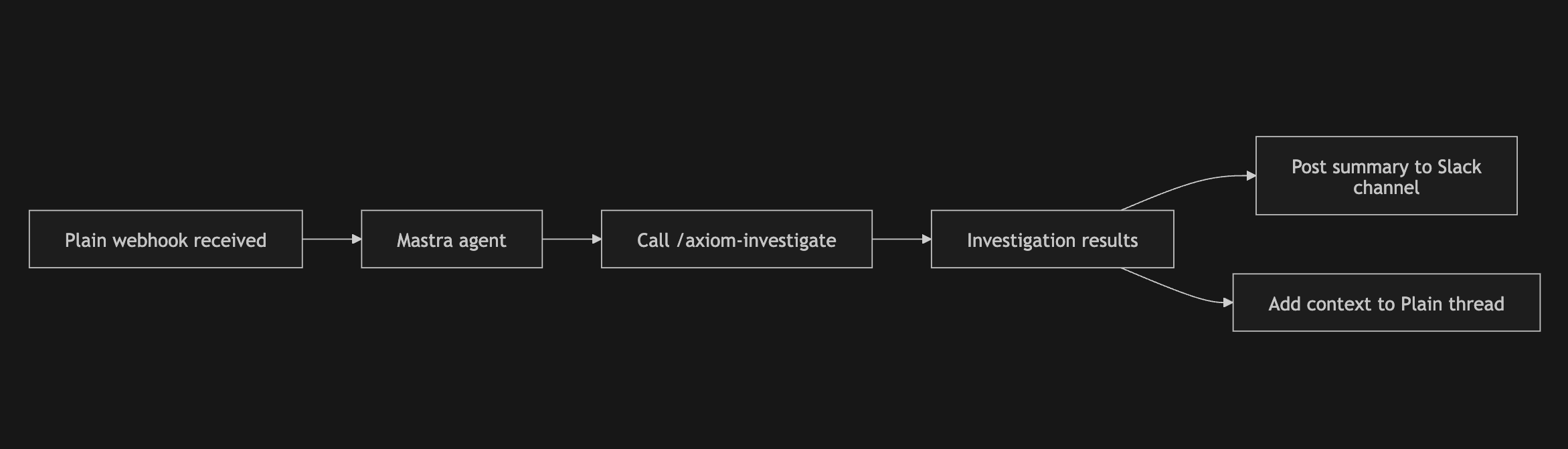
To be honest though, this version of the agent has mostly been useful for straightforward investigations. Once an issue requires deeper iteration, we usually fall back to running investigations locally in Claude Code instead.
Where agents could improve
It's surprisingly difficult to fully replicate the local Claude Code environment in the cloud. Locally, we've already gotten to the point where even fairly involved bug fixes can be handled autonomously through a test-driven workflow. Recreating that reliably in a hosted agent has been much harder than expected though — MCP auth is flaky, skills don't seem to trigger correctly, and the overall understanding of our codebase feels noticeably worse. It's hard to pinpoint exactly where things break down, but the quality gap between local and hosted agents is still very real.
The interaction model also changes. With our autonomous support agent, we interact with it over Slack — agent investigates a ticket, posts results to Slack, and we then converse in a thread to dig deeper. However, in comparison to Claude Code or Codex, the slack interface just feels kinda clunky. There are a lot of "features" which aren't quite optimised, like agent thinking, tool calling, etc. At some point, the overhead of continuing an investigation over Slack becomes higher than just opening a new Claude Code session locally.
I suspect that the future would be about exposing functionality to existing harnesses like Claude Code or Codex, rather than rebuilding those interaction patterns from scratch. I haven't been able to quite visualise what this looks like yet, but I imagine in our case, it would be something along the lines of a Plain webhook triggering a cloud Claude Code session, which we can then continue on locally, etc. What I do know though, is that there's something really powerful about having a single harness with access to all the relevant tools and context.